Shop Desk, shop software for every trade
Every Job, From the Call to Paid.
Leads, quotes, written yeses, jobs, invoices and payment in one place. Free to start, no card.

- Free plan
- $0 forever
- Solo
- $50 a month
- Pro
- $149 a month
- Jobs run on Shop Desk
- 2,444
Jobs counted on the Shop Desk database, October 12, 2026. 1,783 of them closed and paid. Plans as listed on the Shop Desk signup.
Where the Money Leaks Out of a Small Business
Not in the work. In the gaps between the call, the price, the yes and the bill. These are the four places the Shop Desk home screen watches for you.
- Not answered
- A lead sits for two days because it lived in somebody's texts.
- No yes
- A quote goes out and nobody follows up, or the work starts without a yes on file.
- Not billed
- The job is finished and the invoice never went.
- Not paid
- The invoice went and nobody noticed it was never paid.
Shop Desk was built inside a working repair shop that runs on it every day. Every rule in it is a mistake that shop already paid for once.
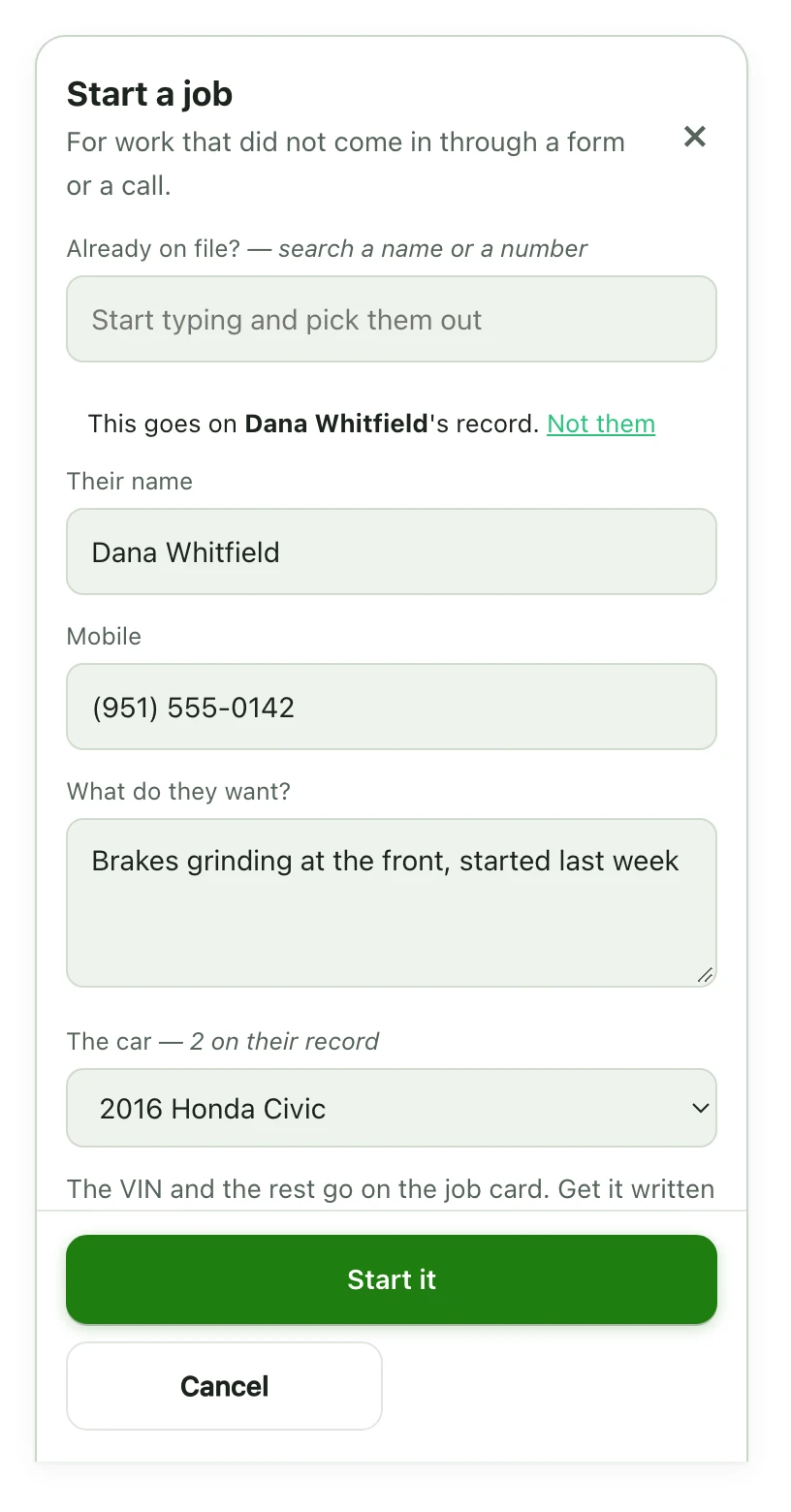
The Real Screens
These are Shop Desk's own screens, drawn from the app's own code and stylesheet. The people and jobs are made up, so no real customer is on screen.


Try it on your own jobs. The free plan takes no card.
Built in a Shop. Made for Every Trade.
Shop Desk runs any business that takes a call, prices a job, gets a yes, does the work and bills it. Pick your trade and the whole desk speaks it. A garage door company reads Doors where a garage reads Vehicles.
Not on the list yet? The desk runs quotes, jobs and invoices the same way. Tell us your trade when you sign up.
Trades the Desk Already Speaks
- Auto repair and mobile mechanics
- Garage doors
- Locksmiths
- Private investigators
- Headlight restoration
- RV repair and rentals
- Marketing agencies
How a Job Moves Through the Desk
A Lead Comes In
A call, a text, a form or an email. Take the name, the number and what they need.
You Price It and Send It
The customer gets a link to their own page. No app and no password.
They Say Yes
Signed on their screen or spoken on the phone, and it is on file before any work starts. Bigger than the price? Stop, price it again, get a new yes.
You Book It and Do the Work
Photos before and after, notes on the job, everything in one place.
Bill It and Get Paid
The invoice comes off the lines. Record how they paid. Finished and paid are two different things, and the desk knows it.
Pick a Plan
Start free. Move up when the work does. Cancel any time from Plan and billing.
Free
$0 forever
Not a trial. No card to sign up.
- 100 customers
- 25 AI answers a month
- Jobs, bookings and inspections
- Each customer's own page
Solo
$50 a month
Everything in Pro until your first 100 closed and paid jobs.Solo moves to $149 a month, the Pro price, after your first 100 closed and paid jobs. You get an email first.
- Everything in Pro
- Then $149 a month, with an email first
Pro
$149 a month
For a busy shop with a team.
- 5,000 customers
- Unlimited AI answers
- Invoicing and card paymentsCard payments run through your own payment account, set up on a short call. Until then you record cash, check and transfer payments.
- Payroll for your team
Plans and prices as listed on the Shop Desk signup, October 12, 2026.
Straight Answers
Still wondering about something? Email hello@supercanic.com and a real person answers.
Is Shop Desk only for mechanics?
No. It was built inside an auto repair shop, and it runs any business that takes a call, prices a job, gets a yes, does the work and bills it. The words change to fit your trade. A garage door company reads Doors where a garage reads Vehicles.
Is the free plan really free?
Yes. Free is a plan, not a trial. $0 forever, no card to sign up. It covers 100 customers, 25 AI answers a month, jobs, bookings, inspections and each customer's own page.
What is the difference between Solo and Pro?
They are the same software. Pro is $149 a month. Solo is everything in Pro for $50 a month until your first 100 closed and paid jobs, then it moves to $149, with an email first.
Can I take card payments on day one?
Not on day one. Card payments run through your own payment account, and that takes a short setup call. Until then you record cash, check and transfer payments on the job.
Do I need to install anything?
No. It runs in a browser on your phone, a tablet in the bay or a laptop at the counter.
Does my customer need an app or a password?
No. One text opens their own page. They see the stage, the photos, the price before the work starts, an approve button, and the receipt after.
What stops a job from starting without a yes?
The desk does. Nothing becomes a job, an appointment or a held slot until the customer approves the estimate, and a job cannot start before that yes is on file.
Can I cancel?
Yes, any time, from Plan and billing inside Shop Desk. Free stays free.
Run Your Next Job on Shop Desk
Free forever to start, no card. Built in a working shop and used there every day.