Seller NotesChecklist updated November 2026
The Website Launch Checklist for Local Client Sites
- Turn off everything you used to build the site. The WordPress box that discourages search engines is the one that gets left on.
- Let Google and the AI search crawlers in. Blocking GPTBot keeps a site out of training, while OAI-SearchBot is the one ChatGPT search uses.
- Make the name, phone and address match on the site, in the markup and on the Google profile. In our audits, 20 of 28 local sites had no local business markup at all.
- Test it on the owner's phone, not your laptop. The median main content load in our audits was 5.6 seconds, against Google's 2.5 second mark for good.
- Hand over the domain, the admin login and the backups in writing, in the owner's name.

Author Source EEAT Authors · Anthony's Author Page
A launch checklist for a client site comes down to four proofs on the live domain. Crawlers are let in, the business facts match everywhere, it works on a phone and the owner holds the keys. Skip one and the owner pays for it in calls that never come, and you hear about it months after you've been paid.
We build sites for mechanics, locksmiths and garage door companies, and the launch misses that cost owners real calls are almost never design. They were a box left ticked, a phone number that didn't match, or a domain nobody could find the login for. WordPress runs 58.1% of the sites whose content system W3Techs can identify, so most of the sites you hand off will be WordPress, and that's what this list assumes.
We also run full audits on local businesses. In the 35 audits we ran from September 28 to October 11, 2026, the same launch gaps kept coming up. I'll give you those counts where they fit.
Turn Off Everything You Used to Build It
Every build leaves scaffolding behind. The worst piece is the one you can't see on the page.
In WordPress, the Reading screen has a box called Discourage search engines from indexing this site. Since version 5.3, ticking it prints a robots meta tag into every page that tells search engines not to index or follow it, per the WordPress.org docs. Builders tick it on staging and forget it. The site looks perfect to the owner and stays out of Google.
So before launch, open the live home page, view the source and search for the robots meta tag. If it says no index, the page is hidden. Do it on the home page, a service page and the contact page, because some plugins set it per page.
- Untick the Discourage search engines box on the live site.
- Open the robots file on the live domain. It shouldn't carry a Disallow line with a lone slash under every user agent.
- Delete the staging copy, or lock it behind a password. A second copy of the site that Google can reach competes with the real one.
- Make every version land on one address. The http, www and bare versions should all redirect to the same https home page.
- Remove test pages, sample posts and any page still showing placeholder text.
One trap catches careful people too. If you block a page in robots.txt, Google can't crawl it, so it never sees the no index tag on it. Google's own docs say the page can still show up in results if other pages link to it. Use one or the other on purpose, never both by accident.
Let Google and the AI Crawlers In
Search now runs through more than one door. Google still sends most local calls, but owners are getting found in ChatGPT search and Copilot too.
OpenAI runs separate crawlers for separate jobs. OpenAI's crawler page says sites that block OAI-SearchBot won't be shown in ChatGPT search answers. GPTBot is the one that collects pages for model training. You can block training and still be found in search, because they're separate switches. OpenAI says a robots change takes about 24 hours to apply to search.
- Read the live robots file line by line. Allow Googlebot, Bingbot and OAI-SearchBot unless the owner says otherwise.
- Ask the owner about training bots and write the answer down. It's their call, not yours.
- Put a Sitemap line in the robots file and submit the sitemap in Google Search Console and Bing Webmaster Tools.
- Turn on IndexNow if your setup supports it. It pings Bing and the other engines that take part each time a page changes. The protocol checks a small key file at your site root, so make sure that file is live.
- Check that your host or firewall isn't blocking AI crawlers. Some security tools have a switch for it, and the site owner never sees it.
A sitemap is a hint, not an order. Google says it ignores the priority and change frequency tags, and uses the last modified date only when it's consistently accurate. Don't waste time tuning tags Google doesn't read. Make the dates true instead.
Make the Business Facts Match Everywhere
A local site isn't done until it says the same thing the Google profile says. Same name, same phone, same address or service area, same hours.
Google names three things that decide local results, which are relevance, distance and prominence. Its Business Profile help page also tells owners to keep their profile as complete as possible, hours included. Your site backs that up when the facts match and Google can read them directly.
That last part gets skipped most. In our audits, 20 of the 28 sites we could check had no local business markup. That's the code that tells Google the name, address, phone and hours in a form it reads directly. Google's local business markup guide lists what goes in it. Add it, then run the page through Google's Rich Results Test.
- Copy the name and phone from the Google profile, not from the owner's memory or an old business card.
- Put the phone in the header as a tap to call link.
- Match the hours on the site to the hours on the profile, holidays too.
- Link the site from the Google profile, and link to the profile from the contact page.
- Check the big directories for old phone numbers. In our audits, 15 of 29 businesses weren't on any of the nine directories we searched, so most owners have work to do there.
Test It on the Owner's Phone, Not Yours
Your laptop is fast, close to the router and already logged in. The owner's customers are on a phone in a parking lot.
Google's mark for a good load is 2.5 seconds for the main content, and anything over 4 seconds is poor, per web.dev. On the 25 audited sites we could test on Google's mobile test, the median was 5.6 seconds. Six of them scored under 50 out of 100.
Main Content Load on a Phone
Most slow local sites are slow for the same few reasons. A giant hero photo, a slider nobody asked for, and five plugins that each load their own scripts. Fix those first.
- Load the home page on a real phone over cell data, with Wi-Fi off.
- Send a test lead through every form and make sure it reaches the owner's phone, not just your inbox.
- Tap the phone number in the header and let it ring.
- Check contrast, image text and form labels. The 2026 WebAIM Million found detectable accessibility failures on 95.9% of home pages, led by low contrast text, missing image text and unlabeled form fields.
- Give every image a short, plain description of what's in it.
Check the Page the Way a Crawler Reads It
The page you see in a browser isn't always the page a crawler gets. Scripts, cookie walls and caching can change what's actually served. So check the raw page, not the pretty one.
You can do that by hand. Use the URL Inspection tool in Search Console to see the page Google fetched, then view the source and search for the title, the description, the phone number and the markup. It takes about ten minutes a page, which is fine for one site and painful for twenty.
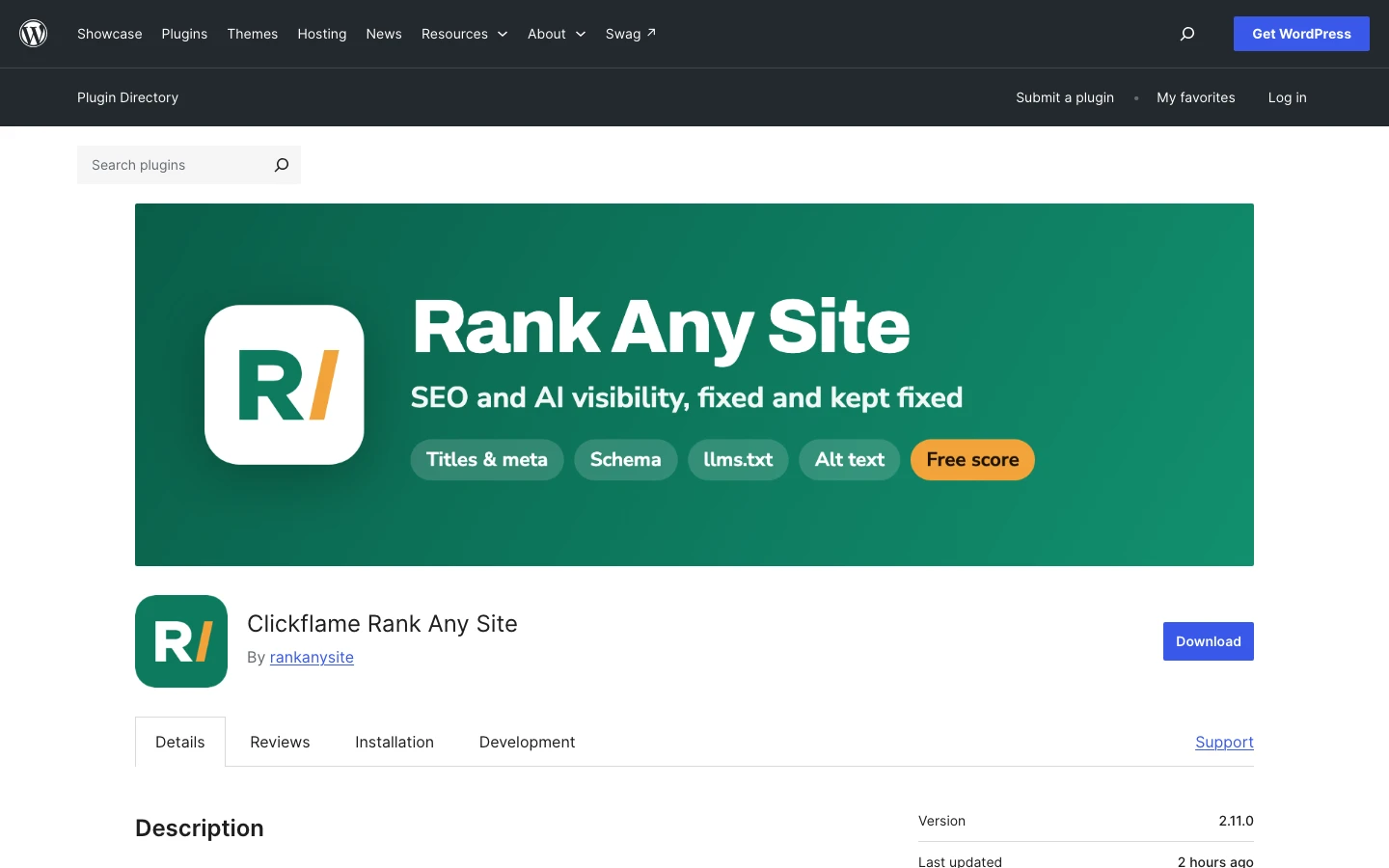
We built a plugin for this because we got tired of doing it by hand. It's called Clickflame Rank Any Site, and it went into the WordPress.org plugin directory on November 7, 2026. Version 2.11.0 needs WordPress 6.9 or newer and PHP 7.4 or higher. It's ours, so weigh what I say about it with that in mind.
The free part needs no account. It runs a live page check that reads the published page the way Google and AI crawlers do, and an AI readiness check that asks whether an AI tool could answer from that page. It also has a Citation Finder with more than 900 directories you can filter by trade, and a Citation Tracker that keeps a status for each one. It runs beside the SEO plugin the site already has and passes values into that plugin's tags, so you don't have to rip anything out. It doesn't submit the business to directories. You or the owner still add or claim each listing.
Paid plans apply the fixes for you, like titles written from the page, schema, image text and redirects for dead pages. Rank Any Site's pricing page lists $5 for the first month, then $29 a month for one site, $79 for five or $199 for 25. If you hand off one site a year, the free checks and this list are plenty.
Hand Over the Keys in Writing
The launch isn't finished until the owner can run the business without calling you. A domain registered in a builder's name is a domain the owner can lose when that builder moves on. Don't be that builder.
ICANN's registrant rights page is written for whoever is listed as the registrant. Make that the owner's business. You can still manage the domain for them.
| Hand Over | In Whose Name | Write Down |
|---|---|---|
| Domain | The business | Registrar, renewal date, who pays |
| WordPress admin | The owner, their own login | Your login stays as a second admin |
| Hosting | The business or you, agreed in writing | Monthly cost and what it covers |
| Backups | Stored where the owner can reach them | How often, how long they're kept |
| Search Console | The owner as main owner | You added as a user |
| Google profile | The owner as main owner | You added as a manager |
| Plugin updates | Whoever you agreed | How often, and the cost |
Put that table in the welcome email. An owner who gets it on day one rarely argues about anything later.
The Launch Sheet to Print
Print this and tick it on launch day. If a line fails, the site doesn't go live yet.
| Check | Passes When |
|---|---|
| Discourage search engines box | Unticked on the live site |
| Robots meta tag in the page source | Never says no index on a page meant to rank |
| Robots file | Lets Googlebot, Bingbot and OAI-SearchBot in |
| Training bots | Set the way the owner chose |
| One address | http, www and bare all land on one https home page |
| Staging copy | Deleted or behind a password |
| Sitemap | Live, listed in robots, submitted to Google and Bing |
| IndexNow key file | Live at the site root, if used |
| Name, phone, hours | Match the Google profile word for word |
| Local business markup | Passes the Rich Results Test |
| Tap to call | Rings the right phone |
| Every form | Test lead reaches the owner's phone |
| Phone load | Main content in 2.5 seconds or close to it |
| Contrast, image text, labels | No failures on the home and contact pages |
| Titles and descriptions | Unique on every page, with the city and phone |
| Domain | In the business's name |
| Admin login | Owner has their own |
| Backups | Running, and the owner knows where |
Common Misreads
Ticking the Discourage box doesn't hide a staging site. WordPress's own docs say it's up to search engines to honor the request, and it doesn't stop anyone from visiting. Use a password if the site must stay private.
Blocking GPTBot doesn't take a site out of ChatGPT search. Blocking OAI-SearchBot does. Mix those up and you'll either hide the owner from a new source of calls or give away content they wanted kept back.
A green score in an SEO plugin isn't a launch check. Most of those scores grade the words on a page. They don't ring the phone, send a test lead or ask who owns the domain. Those are the checks that keep a client.
If you want to see what launches look like before you build one, start with how we sell sites with a demo first, or browse local businesses that still have no website.
What Comes Up on Calls
- How long until my new site shows up on Google?
- There's no fixed clock, so don't promise one. Submit the sitemap in Search Console, ask Google to index the home page and the main service page, and check the Pages report after a week. If the home page still isn't in, the cause is almost always on your side, like a leftover robots tag set to no index or a robots file that blocks everything.
- Should I block AI bots on a local business site?
- Ask the owner, then set it on purpose. Most local owners want to be found in ChatGPT search, so leave OAI-SearchBot open. If they don't want their pages used to train models, block GPTBot. The two are separate switches, and blocking one doesn't block the other.
- Who should own the domain, me or the client?
- The client's business should be the registrant. You can manage it for them, and you can bill for that. When the domain sits in your name, the owner can't leave without your help, and an owner who finds that out stops trusting everything else you built.
- The theme says it's SEO ready. Do I still need to check all this?
- Yes. A theme can print clean headings and fast code, but it can't know the owner's phone number, service area or license. It also can't untick a box you ticked during the build. Check the live page, not the theme's sales page.
- What should I give the client on launch day?
- A one page sheet with the domain registrar, the admin login in their own name, where the backups live, who updates plugins and what that costs. Add the Search Console property and the Google profile, both with the owner as the main owner.
- Do I need a paid SEO plugin to launch a small site?
- No. Everything on this list can be checked by hand with a browser, Search Console and the page source. A plugin only saves time when you hand off sites every month and need the same checks run the same way each time.
Keep w3bsiter in your Google results
Public Records Used
WordPress.org, Settings Reading Screen, Search Engine Visibility
Google Search Central, Block Search Indexing
Google Search Central, Build and Submit a Sitemap
OpenAI, Overview of OpenAI Crawlers
IndexNow, Documentation
Bing, Get Started with IndexNow
Google Business Profile Help, Tips to Improve Your Local Ranking on Google
Google Search Central, Local Business Structured Data
web.dev, Largest Contentful Paint
WebAIM, The WebAIM Million, 2026 Report
ICANN, Registrants' Benefits and Responsibilities
W3Techs, Usage Statistics and Market Share of WordPress
WordPress.org Plugin Directory, Clickflame Rank Any Site
You Might Need This Too
w3bsiter is the sales program for people who would rather find and close owners than build sites. We do the marketing and you keep 50% of what the client pays. See how the split works.