Seller NotesPass marks updated November 2026
12 Point Website Audit Checklist for Local Business Sites
- Run all 12 checks on a phone, not a laptop. Google indexes and ranks the phone version of a site.
- Give every check a pass mark the owner can look up. Google calls a main content load of 2.5 seconds or less good and anything over 4 seconds poor.
- Start with whether the site opens at all. In our October 2026 crawl, 18,181 of 22,084 auto repair shop websites gave back a readable page.
- Look for local business markup. In our own audits, 20 of 28 local sites had none.
- Hand the owner the three worst results in plain words, and never tie a fix to a promised ranking.

Author Source EEAT Authors · Anthony's Author Page
A website audit checklist for a local business needs 12 checks, and you can run every one from a phone with free tools. Each check below has a pass mark from Google, the W3C or ICANN, so the owner can look it up and doesn't have to take your word. I put them in the order a customer meets them, from the site opening to the call getting through.
The best known audit lists were written for people who do search work all day. One of them runs past 50 items, and most point you to a paid crawler. A roofer with a five page site doesn't need any of that, and neither do you on a first call.
You need a phone, the owner's web address and about four free tools. Open the site on mobile data with the wifi off, the way a customer in a parking lot would.
Checks 1 to 3, Does the Site Open and Is It Safe
1. The address opens. Type the address from the owner's Google profile or business card into the phone. It passes when the home page loads with no error. That sounds too basic to list, but it's the check that fails most quietly. We crawled the websites listed for 22,084 auto repair shops in October 2026, and 18,181 of them gave us a readable page. That's 82%. Among the rest, 1,157 timed out and 507 answered with a page not found error.
2. The padlock holds. The site should load over https with no browser warning. Then try the address with www and without it. Both should land on the same secure home page. Google lists secure delivery over HTTPS among the questions it asks about page experience.
3. Google hasn't flagged it. Google Safe Browsing warns people before they visit a dangerous site, and its site status tool tells you whether an address is on the list. Paste the owner's address in. It passes when the tool finds no unsafe content. A flagged site is the one result on this list you report the same day.
Checks 4 to 6, Does It Work on a Phone
4. The main content loads fast. Run the home page through Google's PageSpeed Insights and read the mobile tab. The number to write down is Largest Contentful Paint, which is how long the biggest thing on the screen takes to show. Google's thresholds call 2.5 seconds or less good and anything over 4 seconds poor. The overall score has bands too. A score of 90 or more is good, and under 50 is poor.
Two things trip people up here. The top of the report shows real visitor data, and a small local site often doesn't have enough visitors to fill it. When that happens you'll only get the lab test, which loads the page on a simulated mid range phone. Lab scores also move from one run to the next, and Google's scoring guide says so plainly. So I run it three times and quote the middle result.
Seconds for the Main Content to Load on a Phone
5. You can read it and tap it. Hold the phone at arm's length. Pale gray text on white fails most people outdoors. The W3C standard asks for a contrast ratio of at least 4.5 to 1 for normal text. It also asks that buttons and links be at least 24 by 24 CSS pixels, or spaced far enough apart to hit one at a time. PageSpeed Insights tests contrast in its accessibility section, and Google's list of those tests gives it one of the heaviest weights. Tap size you judge with your own thumb. If you hit the wrong link twice, it fails.
This isn't only about comfort. The Justice Department's web guidance from March 18, 2022 says the ADA covers businesses open to the public, and it lists poor color contrast and forms that can't be used as barriers. It also says a business has flexibility in how it complies. I tell owners what the guidance says and stop there. I'm not their lawyer.
6. The phone number dials. Tap the number at the top of the page. It passes when the phone offers to place the call. Many mobile browsers spot phone numbers by themselves, but Google's developer guide says marking the number up as a call link is how you make sure it works every time. Check that the number shown matches the one on the Google profile. Don't place the call unless you have a reason to talk to them.
Checks 7 to 10, Can Google Read It
7. Nothing tells Google to stay out. Open the page source and search it for the word robots. A robots tag set to no index tells Google to drop the page from search results entirely, even when other sites link to it. Builders switch that on during a build and forget to switch it off. It passes when the home page and the service pages carry no such tag.
Do this one on the phone version of the site too. Google indexes and ranks from the mobile version, so a service list that only shows on desktop might as well not exist.
8. Every page has its own title. Read the browser tab on the home page and on two service pages. Google's title guidance asks for a title on every page, and it calls out vague ones like Home. It passes when each title says what the page offers and where. There's no character limit to quote. Google says there isn't one, though long titles get cut off in results.
The description works the same way. Google may use the meta description as the snippet when it sums up the page better than the page text does. Identical descriptions on every page help nobody.
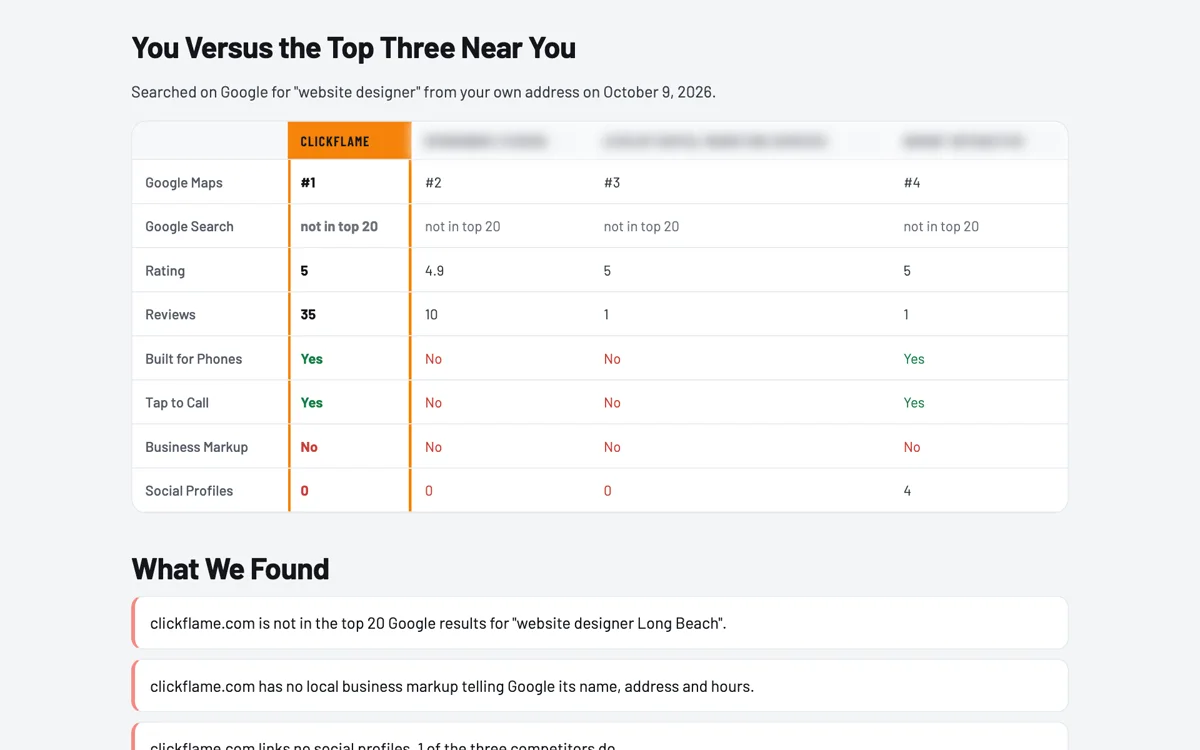
9. The site carries local business markup. This is a block of code that states the name, address, phone and hours in a form Google reads directly. Paste the address into Google's Rich Results Test. It passes when the test finds a local business item with no critical errors. Google requires only the name and address and recommends the phone, hours and web address. In our own audits, 20 of the 28 local sites we could check had no such markup at all.
10. The facts match the Google profile. Put the site next to the business's Google profile. Name, phone, address and hours should match word for word. Google says businesses with complete and accurate information are more likely to show in local results, and that local results rest mainly on relevance, distance and prominence. The same page says nobody can request or pay for a better local ranking. That last line is worth reading aloud to an owner who's been promised one.
Checks 11 and 12, Can a Customer Act and Who Holds the Keys
11. There's a way to ask for work without calling. Look for a quote form or a booking page a customer can finish at 9 p.m. It passes when one exists and its fields make sense on a phone. In our audits, 22 of 28 local sites had no booking or quote request a customer could complete without calling. Don't send a test lead through a stranger's form. Note that the form is there, and test it together once the owner says yes.
12. The business holds its own domain. ICANN runs a free lookup tool at lookup.icann.org. It shows which registrar a domain sits with and, for most domains, when the registration expires. Write both down. Then ask the owner one question. Whose name is on the registrar account? ICANN's list of registrant benefits and responsibilities puts the duty to keep contact details accurate on the person who holds the name. If that person is a designer who left town in 2019, the renewal notices are going to them.
The Scorecard to Fill In
Copy this into your notes app. One line per check, pass or fail, with the number you saw.
| Check | Free Tool | Passes When |
|---|---|---|
| 1. Address opens | Phone browser on mobile data | Home page loads with no error |
| 2. Padlock | Phone browser | https with no warning, www and bare address land on one page |
| 3. Safe Browsing | Google Safe Browsing site status | No unsafe content found |
| 4. Phone speed | PageSpeed Insights, mobile tab | Main content in 2.5 seconds or less, middle of three runs |
| 5. Read and tap | PageSpeed Insights, accessibility section, and your thumb | No contrast failures, and every button is easy to hit the first time |
| 6. Phone number | Your thumb | Tapping it offers a call, and it matches the Google profile |
| 7. Open to Google | Page source | No robots tag set to no index on pages meant to rank |
| 8. Titles | Browser tab, page source | Each page has its own title and description |
| 9. Business markup | Rich Results Test | A local business item with no critical errors |
| 10. Matching facts | Google profile next to the site | Name, phone, address and hours match word for word |
| 11. Way to ask for work | Phone browser | A form or booking page a customer can finish without calling |
| 12. Domain | ICANN lookup | Registrar and expiry known, account in the business's name |
Where the Local Sites We Audited Fell Down
We ran 35 full audits on outside local businesses from September 28 to October 11, 2026, mostly auto repair. The counts are in our Local Visibility Index, and it's a small sample, so I give counts and not percentages.
- Seven of the 35 had no website we could check at all.
- 20 of 28 sites had no local business markup. That's check 9.
- 22 of 28 had no way to book or ask for a quote online. That's check 11.
- The median main content load was 5.6 seconds on the 25 sites we could test on a phone. That's check 4, and it's more than double Google's good mark.
- Six of those 25 scored under 50 out of 100.
So the common failures aren't exotic. They're the middle of this list. A site that opens, has a padlock and looks fine on the owner's own desktop can still fail five checks a customer or Google would notice.
That's also why I'd lead with those three on a call. An owner can see a 5.6 second load on their own phone. They can see an empty result in the Rich Results Test. They can see that their site has no form. Nobody has to trust a score from a tool they've never heard of.
Turn the Results Into One Page for the Owner
Twelve results is too many to read out. Pick the three worst and put them in the owner's words.
- Say what you saw and on what day. "Your home page took 6.1 seconds on my phone on Tuesday" beats "your site is slow."
- Say what the mark is and who set it. Google's 2.5 seconds isn't your opinion.
- Say one fix for each. One sentence, no jargon.
- Take a screenshot of each result, because the owner will want to show a partner.
Then stop before the promise. Google's page experience guide says there's no single signal, and that good Core Web Vitals don't guarantee a top spot. Its markup guide says structured data doesn't guarantee any special display. So I never say "fix these and you'll rank." I say these are the things a customer and Google can both see are broken, and each one is fixable.
If the owner wants to see the fix and not just the list, that's when a demo earns its keep. I wrote up how we sell with a demo first. Once a new site is built, the launch checklist for client sites covers the same ground from the builder's side.
Common Misreads
A long audit isn't a better audit. A list of 80 items buries the three that cost the owner calls. Twelve checks with pass marks will get read. Eighty won't.
The speed score isn't the speed. The score is a blend of lab measurements that shifts between runs. The load time for the main content, in seconds, is the number a person feels.
Passing on desktop doesn't count. Google reads the phone version, and so do most customers looking for a locksmith from a driveway.
Markup isn't a ranking switch. It helps Google read the name, address and hours without guessing. Google says outright that it doesn't guarantee how results will look.
An audit isn't a verdict on the owner. Most of these sites were built years ago by someone who has moved on. The owner has been busy doing the work the site was supposed to bring in.
What Comes Up on Calls
- How long does a website audit take?
- Each of the 12 checks is one page load or one free test, so the whole list fits inside a lunch break. The speed test is the slow one, because you should run it three times. A full crawl of every page is a different job, and a five page local site rarely needs one before a first call.
- How much does a website audit cost?
- Nothing but your time for this list. Every tool named on this page is free and needs no login. Paid audits exist, and the fair question to ask about one is which checks it runs and what the pass mark is for each.
- Do I need the owner's permission to audit their site?
- Not for these checks. They read public pages and public records, the same as any customer with a phone. Stay on that side of the line. Don't send a fake lead through their form, don't try a login page and don't run anything that pushes load at their server.
- Does the site need a score of 100 on the speed test?
- No. Google's own scoring guide says 100 is very hard to reach and isn't expected. A score of 90 or more is in the good band. For a local site I care more that the main content shows up inside 2.5 seconds on a phone.
- What if the business has no website at all?
- Then seven of these checks have nothing to test, and that's your finding. It's common. Of the 25,538 listings in our Local Visibility Index, 38.5% had no real website. Audit the Google profile instead, and show the owner what a site of their own would look like.
- How soon should I run the audit again after a fix?
- Rerun the lab tests the same day, because they load the page fresh each time. The real visitor numbers in PageSpeed Insights cover a trailing 28 days, so give those about a month to catch up.
Keep w3bsiter in your Google results
Public Records Used
Google Search Central, Mobile First Indexing Best Practices
Google Search Central, Understanding Page Experience in Google Search Results
Google Safe Browsing
Google, About PageSpeed Insights
Chrome for Developers, Lighthouse Performance Scoring
web.dev, Web Vitals
Chrome for Developers, Lighthouse Accessibility Scoring
W3C, Understanding Success Criterion 1.4.3 Contrast (Minimum)
W3C, Understanding Success Criterion 2.5.8 Target Size (Minimum)
ADA.gov, Guidance on Web Accessibility and the ADA, March 18, 2022
web.dev, Click to Call
Google Search Central, Block Search Indexing
Google Search Central, Influencing Your Title Links in Search Results
Google Search Central, Control Your Snippets in Search Results
Google Search Central, Local Business Structured Data
Google Business Profile Help, Tips to Improve Your Local Ranking on Google
ICANN, Registrants' Benefits and Responsibilities
You Might Need This Too
w3bsiter is the sales program for people who know local business owners. You find them and show them the audit, we build the website and run the marketing, and you keep 50% of what the client pays. Start a seller account.